User Folder
What is the BeamNG.drive user folder, where to find it, what it contains (mods, settings, cache) and how it differs from the game folder.Game Folder & User Folder
- Game Folder - This is the folder where your game is installed
- User Folder - This is where your personal game files are stored
What is the User Folder?
This is a folder where the game stores your personal files, such as the cache, mods, level changes, settings etc.
Unlike the Game Folder, files of the user folder are being updated when you make changes to the game such as, for example, changing your the game’s resolution.
User folder location
DO NOT store your user folder in your game folder.
If you are using Steam, it may detect these unknown files and decide to remove them during update, the file verification process, or when you reinstall the game. This will cause you to lose all mods, settings, and custom content with no warning.
You can always find the current user folder location in Launcher -> Manage User Folder -> Open user folder
By default, the user folder is located here:
- Windows:
%LOCALAPPDATA%\BeamNG\BeamNG.drive\current - Linux:
~/.local/share/BeamNG/BeamNG.drive/current
The structure of the user folder
The user folder normally contains:
/temp/mods/replays/screenshots/settings/vehicles/../levels/.. for level related saves and /flowEditor for Flowgraph savesThis separation allows for modifications without affecting the original installation, making it easier to return to the original state at any time.
Priority
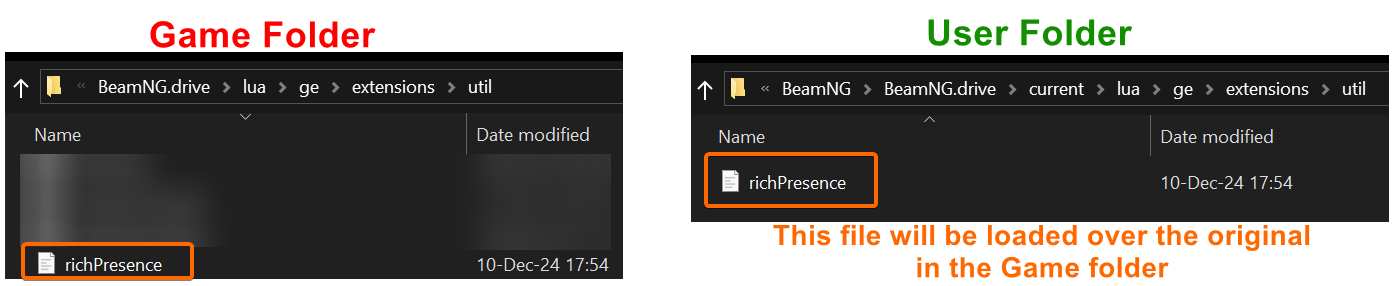
The user folder’s structure mimics the one of the Game Folder. If a file exists in the same relative location in both folders, the one in the user folder will be loaded over the original.
How to change user folder location?
Was this article helpful?