Error 0xFFFFFFFF: game blocked by firewall or antivirus
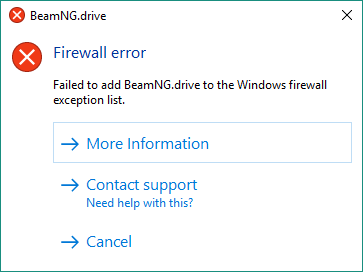
BeamNG.drive shows a Firewall error with exit code 0xFFFFFFFF? Your antivirus or firewall blocks the game: add the game and user folders to the whitelist.This error message is shown when a firewall or antivirus blocks the game.
Firewall
0xFFFFFFFF
Looks like your Antivirus or 3rd party software block the game. Please add Game and User folders into the antivirus whitelist.
If you still cannot get it working, please contact our support: http://www.beamng.com/contactus/
Still not working? Contact our Support team.
Last modified:
October 6, 2026
Was this article helpful?
More in “Game doesn't launch”
All articles →
0xC0000005 / 0x00000001 (access violation)BeamNG.drive crashes or closes with exit code 0xC0000005 STATUS_ACCESS_VIOLATION or 0x00000001? Causes (bugs, drivers, mods, incompatible software) and fixes.
0xC0000135 / 0xC0000139 (missing DLL)Game won't start with 0xC0000135 STATUS_DLL_NOT_FOUND or 0xC0000139 STATUS_ENTRYPOINT_NOT_FOUND? Fix missing DLL, DirectX, Visual C++ or unsupported Windows.
Incompatible DirectXBeamNG.drive says your graphics card doesn't support DirectX 11? What the error means, how to check DirectX, play an old DX9/DX10 version or get a refund.
0xC000012F (integrity error)BeamNG.drive shows an Integrity Error with code 0xC000012F STATUS_INVALID_IMAGE_NOT_MZ? Your game installation is broken: verify game files or reinstall.
0xE0000002–0xE0000004 (user folder)Fix 0xE0000002 INVALID_ROOT_PATH, 0xE0000003 INVALID_USER_PATH, 0xE0000004 USER_PATH_UNWRITABLE and 0x3000004 Failed to create user directory.
1x44444448, ExeNotFound, 0x000002E4Launcher says the game is unable to start with 1x44444448, ExeNotFound (executable not found) or 0x000002E4 (administrator rights required)? See the fix.